In short
- A headless browser is a real browser with no window, run by a program instead of a person. Tools like Puppeteer, Playwright and Selenium drive it.
- Cheap bots only call themselves Chrome. A real Chrome always sends a few extra details with every visit, and these bots don't. That's easy to catch in a split second.
- Modern headless Chrome is real Chrome, just without a window. It looks right in every detail, so checking what it says about itself isn't enough.
- What still gives it away is where it runs: rented servers in datacenters, not someone's home or phone.
In how to tell a bot click from a human click we mentioned one check called "Chrome that isn't Chrome". Here it is in more detail. Headless browsers are behind a lot of the automation that's hardest to notice: scrapers, tools that check landing pages, ad-verification services and some security sandboxes.
What a headless browser is
Think of an ordinary browser with the screen switched off. Nobody sits in front of it. A program tells it what to do: open this page, click that button, fill in the form, take a screenshot.
The best-known tools for this are:
- Puppeteer, which drives Chrome;
- Playwright, which drives Chrome, Firefox and Safari's engine;
- Selenium, the long-standing standard for browser automation.
These are honest tools. Developers use them every day to test websites. But they're also the obvious choice for anyone who wants a robot to look like a person.
Three kinds of "Chrome" you'll meet
1. A script that only says it's Chrome
The cheapest bot isn't a browser at all. It's a small program that fetches pages and simply writes "I'm Chrome" in its introduction.
The trouble for it: a real, modern Chrome never arrives with just a name. Every time it opens a secure page, it also sends a handful of extra notes about itself and about the kind of visit it is. A visitor that claims to be a recent Chrome but brings none of these notes isn't Chrome. It's like someone in a uniform with no badge, no ID and no paperwork.
2. Old headless Chrome
The first headless mode was a separate, stripped-down version of Chrome. It was surprisingly honest: it literally introduced itself as "HeadlessChrome". Plenty of automation still runs on it. Some people change the name but forget it also appears in one of those extra notes, so it still gives itself away.
3. Modern headless Chrome
Since 2023 Chrome has had a "new" headless mode. It runs the full browser, only without a window. Recent versions of Puppeteer use it by default. It sends exactly what the Chrome on your laptop sends, because it is the same Chrome.
This is where checking "what the visitor says about itself" runs out. It's better to admit that than to pretend otherwise.
What a redirect can see, and what it can't
When someone clicks a short link, the redirect has a split second to decide where to send them. It can't run anything inside the visitor's browser. A full web page can, but it takes longer.
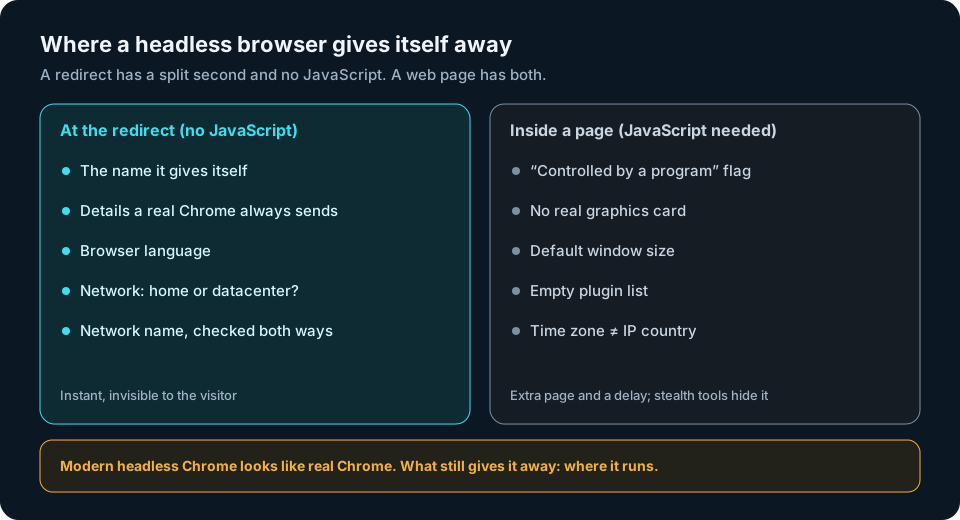
What the redirect sees right away
- The name the visitor gives itself. "HeadlessChrome" anywhere means a robot, full stop.
- Whether the usual Chrome notes are there. A "Chrome" with none of them is a script in disguise.
- The browser language. Real browsers say which language their owner reads. Many bots don't bother.
- The network. Headless browsers almost always run on rented servers. If the visit comes from a hosting company or a cloud, it's a server, no matter how perfect it looks. More on this in datacenter vs residential IPs.
- The network's own name, checked both ways. Servers often carry hosting names that give them away, and a fake "Googlebot" can't confirm a name it doesn't own. See forward-confirmed reverse DNS.
What only a web page can see
With a script running inside the page, you can spot more: a built-in flag that says "this browser is controlled by a program", no real graphics card, an unusual default window size, an empty list of plugins, or a time zone that doesn't match the country.
That's useful on a website. On a redirect, it costs too much. You'd have to show an extra page and make every real person wait. Many scanners don't run scripts at all. And there are ready-made "stealth" add-ons built to hide exactly these signs. It's an arms race you don't need to join just to send someone to the right page.
Why the network matters most
A modern headless Chrome can copy a real Chrome perfectly. What it can't easily change is where it lives. Automation at scale runs on servers, and servers sit in datacenters. That's why the network check keeps working when everything else looks spotless.
The honest exception: bots that route their traffic through home or mobile connections. Then the network looks like a person's, and only behaviour is left to judge by. No filter catches every bot.
Mistakes to avoid
- Don't punish Safari and Firefox. They don't send Chrome's extra notes, and they're not supposed to. Chrome on the iPhone is Safari underneath, so it doesn't send them either. Only judge visitors that claim to be Chrome.
- Don't judge by one missing note. Some privacy tools strip a single detail. Only treat a "Chrome" as fake when all the usual notes are missing.
- Don't block privacy services. People using iCloud Private Relay or Cloudflare WARP are real people, even though their visits come through big provider networks. We wrote about it in privacy relay users are humans.
- Don't put a captcha on a redirect. It loses you real clicks and barely slows robots down.
How createlink.link handles it
The Anti-Bot filter in createlink.link runs on your own server and decides before the visit goes anywhere. No captcha, no "I'm not a robot", nothing for the visitor to do.
- "Chrome that isn't Chrome". A visitor that calls itself a modern Chrome but brings none of the notes a real Chrome always sends doesn't get your page. iPhones are never judged by this test, and neither are Safari or Firefox.
- Honest headless. A visitor that introduces itself as "HeadlessChrome" is treated as a robot.
- The network. For modern headless browsers that look perfect, the network check takes over: hosting companies and clouds never receive your destination page. The list of networks lives on our platform and is updated there, so you don't need to change anything on your server.
A blocked bot gets a neutral page instead. It doesn't use up any of the link's three visits, so they all stay for the real person you wrote to. And every block shows up in your statistics under "Humans vs bots", so you see what the filter stopped as a number.
Quick checklist
- "HeadlessChrome" in a visitor's introduction means a robot.
- A "Chrome" missing all the usual Chrome notes is a script in disguise.
- Never apply that test to Safari, Firefox or iPhones.
- Expect modern headless Chrome to look perfect; catch it by where it runs.
- Keep in-page script checks for websites, not redirects.
- Let privacy services through, and skip the captcha.
A headless browser can copy Chrome perfectly. It still has to run somewhere, and that's usually what gives it away.
