In short
- Any program can call itself "Googlebot". The name in a request is just text the visitor types about itself.
- Every server address can also carry a name. But the owner of the address picks that name, so a fake can pick
googlebot.comtoo. - The fix is to ask the question twice: "what is this address called?" and then "where does that name really point?". Only Google can make a
googlebot.comname point back to its own address. - If the answer comes back to the same address, it's the real thing. If there's no name at all, that proves nothing. Most real people have no special name, and they should never be blocked for it.
Imagine a stranger at your door wearing a courier's jacket. The jacket proves nothing, since anyone can buy one. So you call the courier company and ask: "Is this person yours?" If the company says yes, you open the door.
Checking a visitor on the internet works the same way. Forward-confirmed reverse DNS is the long name for that phone call. Below is what it is, why it works, and how our Anti-Bot filter uses it to protect your links.
Why the visitor's own words aren't enough
Every visit to a web page comes with a short note from the visitor: "I am Chrome on Windows" or "I am Googlebot". It's called the User-Agent. The visitor writes it about itself, and nobody checks it.
That's why bad bots love to say they're Googlebot. Many sites let Google in everywhere, because nobody wants to vanish from search results. So copying Google's name is the cheapest disguise there is. If you trust the note, you trust whoever wrote it.
You need something the visitor can't make up. The internet's address book, DNS, gives you that.
Step one: the name an address gives itself
You know DNS from everyday use: you type example.com, and DNS finds the server's address, a string of numbers like 192.0.2.10.
It also works the other way round. You can take an address and ask: "What is this called?" This is reverse DNS. Hosting companies often give their servers names here, and Google's crawlers have names like crawl-66-249-66-1.googlebot.com.
There's a catch. The name for an address is set by whoever owns the address, not by whoever owns the domain in the name. If someone rents a cheap server, the hosting company will often let them set any name they like, including one ending in googlebot.com.
So step one alone is like the courier's jacket: a claim, not proof.
Step two: ask the name where it points
Now comes the phone call. You take the name from step one and look it up the usual way: "Where does crawl-66-249-66-1.googlebot.com point?"
This answer comes from the owner of the domain, so for googlebot.com that's Google, and only Google. A faker can stick any name on their own server, but they can't make Google's address book point to that server.
So you compare:
- The same address comes back. The name is confirmed. It really is Google.
- A different address comes back. The name was borrowed. It isn't Google, whatever it says.
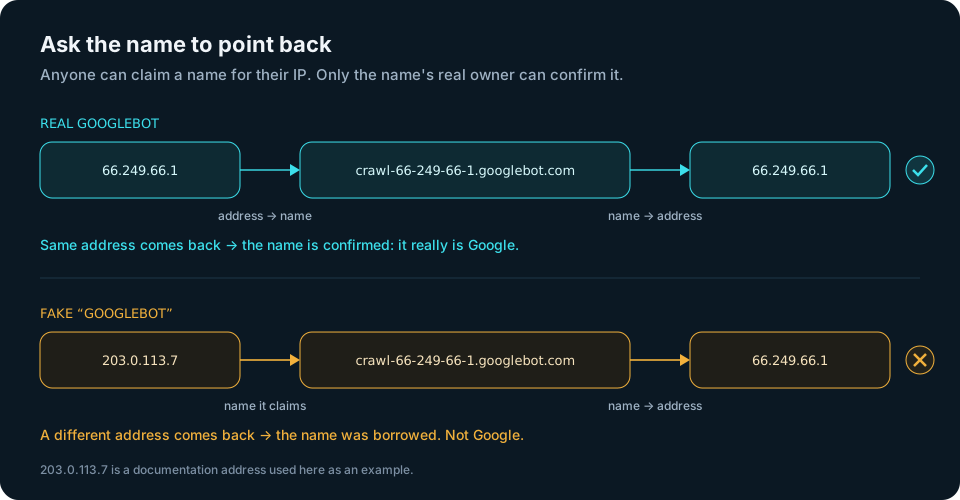
That's the whole idea: "reverse" (address to name), then "forward-confirmed" (name back to address). Google describes exactly this method in its own >guide to verifying Googlebot. Bing, Apple and other search engines publish the same kind of instructions for their crawlers.
It also spots servers pretending to be people
The same check helps with visitors that don't claim to be search engines at all. Big hosting and cloud companies often give their servers names that say where they live, for example names that end in amazonaws.com (Amazon's cloud) or googleusercontent.com (Google's cloud).
If a "browser" arrives from an address whose confirmed name belongs to a hosting company, it's a server, not a person sitting at home. People don't browse the web from a data center. Together with the network check, this catches most automated tools that run in the cloud.
What the check can't tell you
It's a precise test, but it has limits, and it's important to know them.
- No name doesn't mean bot. Most home and mobile connections have no special name, or a dull generic one. A missing name means "unknown", not "suspicious". If you blocked those, you'd block real people.
- It takes a moment. Two questions to the address book take a little time. When a person is waiting for a link to open, the check has to be quick, so it runs after the faster checks and remembers recent answers.
- When in doubt, let the person through. If the address book is slow or doesn't answer, the visit should be treated as human. A slow lookup must never turn away a real customer.
- Look at the end of the name. A trickster can make a name like
googlebot.com.example.net. It contains "googlebot.com" but ends inexample.net, so it belongs to someone else. Only the ending counts.
How createlink.link uses it
createlink.link is a self-hosted URL shortener with an Anti-Bot filter. You run a small agent on your own server and your own domain, and you create personal links: one link per recipient, for emails, personal messages and SMS. Each link opens for three visits by real people.
Bots visit those links all the time: mail security scanners, link previews, search crawlers, SEO tools. If a bot used up a person's visits, the link would close before the person even saw it. And your statistics would show "clicks" that never happened.
The filter makes its decision on your own server before the visitor goes anywhere. It runs four checks in a row, and forward-confirmed reverse DNS is the third:
- Search crawlers and SEO scanners are recognised by a name that has to check out both ways. A fake "Googlebot" doesn't pass.
- A confirmed hosting name counts as a server, not a person.
- A missing name counts as a person. Real visitors on an ordinary home or mobile connection are never turned away for that.
A bot gets a neutral page and doesn't use up any of the link's three visits. Every bot that was stopped shows up in your statistics under "Humans vs bots", so you see the filter working in numbers. No captcha, no "I'm not a robot" button: the person just goes straight to your page.
The filter is strong, but not perfect. It reads what the request reveals, and a very careful bot that looks exactly like a home user can slip through. The other three checks are described in how to tell a bot click from a human click.
A tip if you run your own mail server
Mail services use the same idea. When a server sends email, many receivers check whether its address has a name, and whether that name points back to the same address. If not, the email looks suspicious.
If you send from your own mail server, ask your hosting company to set a name for its address (they may call it "reverse DNS" or "PTR"), and make sure that name points back to the same address. It's a small setting that helps your emails look trustworthy.
To sum up
- What a visitor says about itself proves nothing.
- The name of an address is chosen by the address owner, so on its own it's only a claim.
- Look the name up again: if it points back to the same address, the claim is proven.
- No name means "unknown", never "bot".
Anyone can wear the courier's jacket. Only the real company answers the phone.
