In short
- Your link sees the click. The affiliate network sees the sale. A postback is the network's way of telling you which click the sale came from.
- It works with a short code: the code leaves with the click and comes back with the money.
- It doesn't depend on the visitor's browser, cookies or ad blockers, so it is far more reliable than a pixel on a thank-you page.
- When conversions "go missing", it's almost always one of a few small setup mistakes. There's a list below.
You send people to an offer. The network's dashboard says you earned money. Your own statistics show clicks and nothing else. So which campaign paid? Which list, which email, which domain? Without a bridge between the click and the sale, you're guessing.
That bridge is the postback. You'll also hear "S2S" (server-to-server) or "callback URL". It sounds technical, but the idea fits in one sentence: give the network a code with every click, and ask it to send that code back when the click makes money.
Two places, two notebooks
A click and a sale happen in different places.
- The click happens on your link. Your shortener writes it down: when, which country, which device, which link.
- The sale happens later, on the offer's side: a sign-up, a deposit, a purchase. The affiliate network writes that down and credits your payout.
Think of it as two notebooks kept by two different people. Neither can see the other's page. A postback is a note passed from one to the other: "the sale on line 47 belongs to your click k3Q9".
Pixel or postback?
There are two ways for the network to tell you about a sale.
A pixel is a tiny invisible image or script on the offer's "thank you" page. It runs in the visitor's browser and needs that browser to remember who the person is, usually with cookies. That breaks easily. Ad blockers stop it. Browsers limit cookies between sites. People close the tab too early. Or they come back hours later on a different phone.
A postback skips the browser completely. When the network records a sale, its server sends a short message to an address you gave it. No cookies, no scripts on someone else's page, nothing for an ad blocker to block.
That's why serious affiliate work runs on postbacks, and pixels are only a backup.
How it works, step by step
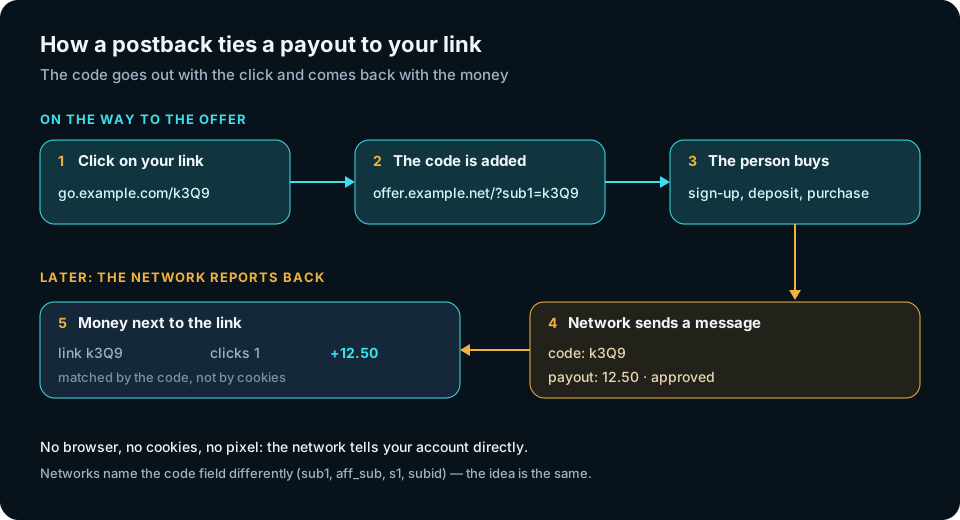
- A person clicks your link, for example
go.example.com/k3Q9. - On the way to the offer, your code is added to the address:
offer.example.net/?sub1=k3Q9. The network saves the code next to its own record of that visit. - The person converts: signs up, pays, installs.
- The network sends a message to your postback address with that same code and the payout inside.
- The code is matched to your link, and the money appears next to the clicks.
That's the whole trick. The rest is getting the names right.
Sub-IDs: one idea, many names
Every network has a "pocket" for your own value, a parameter that carries it through their system untouched. They call it different things: sub1, aff_sub, s1, subid. Some give you several pockets (sub1 to sub5).
The rule is simple: use the same pocket both ways. If the code goes out in sub1, the postback must send sub1 back.
Macros: blanks the network fills in
In the network's dashboard you don't type a finished address. You type a template with macros, little blanks the network fills in for each sale. Depending on the network they look like {sub1}, {payout}, #payout# or [status].
A typical template looks like this:
https://<your postback address>?sub1={sub1}&payout={payout}&status={status}&txid={transaction_id}
Copy the macro names from your network's help page. This is the one place where copying from another network's guide doesn't work: their blanks are called differently.
What the message should carry
At minimum, ask the network to send four things:
- The code (sub-ID). Without it, the money can't be tied to a link.
- The payout. So revenue sits next to traffic.
- The status: approved, pending or rejected. Networks often send a second message later when the status changes.
- A transaction ID. It tells you "this is the same sale as before", so a repeat message updates it instead of counting it twice.
Why conversions go missing
- The blank wasn't filled. If what arrives is the literal text
{sub1}, the macro name is wrong for that network. - Two systems use the same pocket. The offer address already had
sub1from somewhere else, so the values clash. Make sure only one system writes it. - Different pockets out and back. The code went out as
aff_subbut the template sends backsub1, or the other way round. - The address no longer exists. The postback lived on a domain you later dropped, so the network keeps knocking on a closed door. Keep it on an address that doesn't change when your link domains do.
- Only "approved" is set up. Approvals arrive, but rejections don't, so your numbers slowly drift away from the network's.
- No test before launch. Most networks have a "test postback" button. Press it, and check that the test sale really shows up on your side.
Keep the address private
A postback address works like a key: whoever knows it can report sales to you. Don't publish it, don't paste it in public chats, and treat it like a password.
How it works in createlink.link
In createlink.link, postbacks from affiliate and CPA networks are built in.
- The code is added for you. When a person goes from your link to the offer, the link's code goes into
sub1. The name is fixed, so on the network side use the macro forsub1. If the offer address already has its ownsub1, we leave it alone and don't add ours, so don't putsub1in the offer address yourself. - One address for everything. Your account has its own postback address. You paste it into each network once. It works for all your networks and for links on all your domains, because the code belongs to your account, not to a domain.
- It never changes with your domains. The address sits on a technical host, not on your link domains. It never appears in your messages, and you don't have to touch the network settings when you add or swap domains.
- Most common names understood. The usual names for the code (
sub1,aff_sub,s1,subid,click_id) and for the money (payout,amount,revenue) work, plus status, currency and transaction ID. - Status updates count. If the network sends the same sale again with a new status, the sale is updated, and you can see its history in your stats.
- Nothing silently lost. A sale whose code can't be matched is still saved, so you can look into it.
- Revenue in the funnel. Opens, clicks by real people and sales sit side by side in your statistics, with bots already filtered out (here's why so many link clicks are fake). The numbers are kept by the platform, not on your server.
One honest limit: createlink.link only receives postbacks from affiliate networks. It doesn't send postbacks to ad networks, because it isn't built for push, pop, native or any other ad traffic. It makes personal links for email, personal messages and SMS.
Checklist
- Pick one sub-ID "pocket" and use it both ways (with us, it's
sub1). - Copy macro names from your network's help page.
- Send at least the code, payout, status and transaction ID.
- Keep the postback on an address that won't vanish when link domains change.
- Press "test postback" and check the result before real traffic.
- Treat the postback address like a password.
Once the postback works, "which link made money?" answers itself.
