In short
- When a link is pasted into a messenger or social network, the platform fetches it to build a preview card with a title, image and description. That fetch happens before anyone clicks.
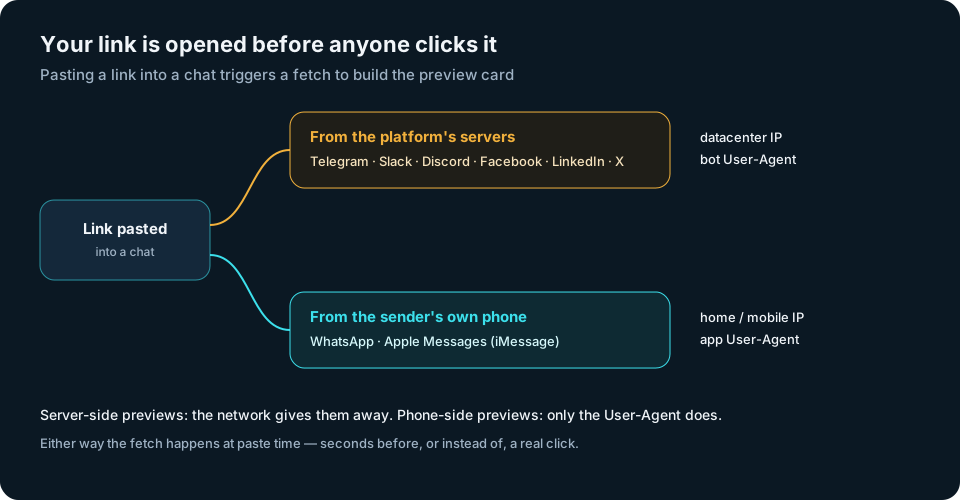
- Telegram, Slack, Discord, Facebook, LinkedIn and X fetch from their own servers. WhatsApp and Apple Messages fetch from the sender's own phone.
- Each fetch looks like a click to a naive tracker, and it can use up a one-time or limited link.
- Most preview bots announce themselves in the User-Agent. Phone-side previews come from real home and mobile networks, so the User-Agent is often the only clue.
You send someone their personal link in a chat. Before they've even seen the message, your statistics already show a click, and maybe two. Nobody clicked. The messenger opened the link to show a nice preview card.
Link previews are one of the most common sources of fake clicks, and they behave differently from email scanners or crawlers. Here's how they work.
How a preview card is built
A preview card needs a title, a description and usually an image. The platform gets them from the page itself, mostly from Open Graph tags such as og:title, og:description and og:image. To read those tags, something has to download the page.
So when you paste a link, the platform sends a request to it, follows any redirects to the final page, reads the tags and builds the card. That request is your "click".
Two kinds of preview fetches
Server-side: the platform fetches it
Telegram, Slack, Discord, Facebook, LinkedIn and X fetch links from their own infrastructure. The request comes from the platform's network, usually with an honest User-Agent:
| Platform | Typical User-Agent token |
|---|---|
| Telegram | TelegramBot |
| Slack | Slackbot-LinkExpanding |
| Discord | Discordbot |
| Facebook, Messenger, Instagram | facebookexternalhit |
LinkedInBot |
|
| X (Twitter) | Twitterbot |
Two signals line up here: a bot name in the User-Agent and a datacenter network. These are the easy ones.
Phone-side: the sender's device fetches it
WhatsApp and Apple Messages (iMessage) build previews on the sender's phone, which fits their end-to-end encryption: no server has to see the link. The request comes from the sender's own home or mobile connection.
That changes the picture:
- The network looks like a person, because it is the sender's connection. An ASN check won't flag it.
- The User-Agent is often the only clue. WhatsApp identifies itself as
WhatsApp/…. Apple's preview fetches are widely reported to include crawler tokens such asfacebookexternalhitandTwitterbotalongside an ordinary browser string.
So for phone-side previews, a filter that relies only on networks will let them through and count them as clicks.
Why previews cause trouble
- Inflated clicks. One link pasted into a group chat can trigger fetches from several platforms and devices before a single person taps it.
- Burned one-time links. If a personal link accepts a limited number of uses, the preview fetch can use one up. The recipient then finds a link that has already been "used".
- Your landing page in someone else's chat. The card shows your destination's title and image to everyone in the conversation. For a public promotion that's useful. For a page meant only for one recipient, it may not be what you want.
- Wrong timing data. Preview fetches happen at the moment of pasting, so they distort "time to first click".
Caching: why the card doesn't update
Platforms cache previews. If you change a page's title or image, the old card can keep appearing for days. Most platforms give you a way to refresh it: Facebook's Sharing Debugger, LinkedIn's Post Inspector, and for Telegram the official @WebpageBot. Otherwise you wait for the cache to expire.
How to recognise preview fetches
- Match known User-Agent tokens:
TelegramBot,WhatsApp,Slackbot-LinkExpanding,Discordbot,facebookexternalhit,LinkedInBot,Twitterbot. This catches both server-side and phone-side previews. - Combine with the network for server-side previews: a bot name from a datacenter is clear-cut.
- Don't rely on the network alone. Phone-side previews come from real connections and would pass.
- Look at timing. A fetch at the moment a link was sent, with no follow-up requests for the page's images and scripts, is a preview, not a reader.
A real trade-off: protection vs. a pretty card
Here you have to choose:
- If a bot gets your real page, the card looks great, and the bot has seen your destination and counted as a click.
- If a bot gets a neutral page, your destination stays protected and your statistics stay clean, but the card shows the neutral page instead of your landing page.
For public links (social posts, profile bios, community channels) a rich preview often matters more. For personal links sent to one person, protection usually wins: the recipient knows who sent the link, and the card isn't what makes them click.
How createlink.link handles it
The Anti-Bot filter in createlink.link recognises known preview bots by their request signals on your own server, before the redirect. Like any other automation, they get a neutral page: they aren't counted as clicks, they appear under "Humans vs bots", and they don't use up any of a personal link's three clicks. The trade-off described above applies: the preview card in the chat shows the neutral page, not your destination. Server-side previews are also caught by the network check, which is explained in datacenter or home network.
Checklist
- Expect a fetch every time a link is pasted into a messenger or social network.
- Match preview User-Agent tokens. Don't rely on the network alone, because WhatsApp and iMessage fetch from the sender's phone.
- Make sure preview fetches can't use up one-time or limited links.
- Decide per link type: a rich card for public links, protection for personal ones.
- Refresh cached cards with each platform's debugging tool after changing a page.
A preview card looks harmless, but someone had to open your link to draw it. Count that visit as a bot, not as a reader.
